What is Google Drive?

By David Gilbert: Subscribe to David's | April 25, 2012 11:20 AM GMT

  • FOLLOW IBT: YOUR ONE-STOP NEWS SITE
  • Google Plus

Google Drive has been rumoured for quite some time, and the company has finally revealed just what this online digital locker will offer. We take a look at the service and see what features it offers and how it compares to other services from Apple, Dropbox and Microsoft.

Share article

So, what is Google Drive? Essentially Google Drive is a cloud-based locker for your content which is primarily focused on documents and will let you access your content from a range of devices including laptops, PCs, smartphones and tablets whenever you want.

Google is giving all users 5GB of free storage with the option to upgrade to 25GB for $2.50 (£1.55) per month or for power users there is an option for 1TB of storage for $49.99 per month. Users can store documents, presentations, spreadsheets, photos and HD video in the online locker.

  • FOLLOW IBTIMES
  • Google Plus

As well as being able to access Google Drive through your browser, there are desktop apps for Windows and Mac, as well as smartphone and tablet apps, though only for Android devices (version 2.1 and upwards) initially. Versions of the app for the hugely popular iPhone and iPad are due in the next few weeks.

Users will be faced with a simplified grid interface which will allow them to drag and drop files into a folder called My Drive, which is found in the navigation bar in the right hand side of the window. Because this is a cloud-based service your documents will not be stored locally and you will need to be connected to the internet to upload them.

There is however an offline mode, letting you read or view the documents and files you are working on as long as you have retrieved them before losing your connection.

Google Drive will let you view more than 30 file types including some more obscure ones like Adobe Illustrator and Photoshop. Searching is also promising to be more powerful than competitors as users will be able to search entire documents rather than just file names, which is the case for Dropbox.

Of course Google Drive will integrate well with other Google services especially Gmail. Instead of having to attach a large file to an email, you can simply send a link to the person you want to share a particular file with.

Google Drive has integrated the Google Docs service, meaning you can create and collaborate on a range of document types as well as letting you choose exactly what each person you are sharing the files with can do, whether it's just view it, edit it or even share it.

In what looks like a throwback to the now defunct Google Wave service, Drive will let you begin conversations and make comments about documents you are collaborating on.

Google Drive is currently rolling out around the world but has yet to reach the UK, with the company saying it could take up to two week for the service to be available globally.

Google will be hoping that because of the integration with other Google products like Gmail and Google+, a lot of people will adopt the service, and with the ability to easily share and collaborate on documents and spreadsheets, that businesses will looks at the 1TB upgrade options.

Google is pretty late to the online storage party and is facing stiff competition from a number of different companies. Here is a breakdown of the competitors and how Google stacks up.

Google Drive vs Dropbox

Dropbox is the most widely known of all online storage services, getting the jump on everyone else when it launched in 2008. The service offers the first 2GB of storage for free but incentivises users to spread the word by offering an additional 500MB of storage for each referral made to a maximum of 18GB.

Paid for accounts begin at 50GB which cost $9.99 per month or $99 per year, moving up to 100GB for $19.99/$199 with both offering referral schemes also to gain extra storage.

Finally Dropbox for Teams, launched last year, has plans starting at 1TB of storage and is aimed at businesses looking to offer cloud storage with shared access for a number of employees. It offers a centralised administration and billing.

Like Google Drive, Dropbox has desktop apps for Windows and Mac, as well as Android apps and iOS apps. It also has a Linux desktop app and a mobile app for BlackBerrys. Unlike Google Drive your files are stored locally with the desktop apps, meaning you always have access to them, even when offline.

Files are also available through the Dropbox website, meaning like Google Drive no matter what PC or laptop you are using you have access to them.

Sharing is done by creating shared folders which you then invite people to, and you can even share with everyone by creating a link to a file in your Public folder.

Google Drive obviously has an instant advantage over Dropbox by offering 5GB of free storage rather than 2GB but with referrals users do have the potential for a lot more. Pricing by Google is also more aggressive with 50GB costing half the price per month of Dropbox.

Google Drive vs Apple iCloud

Apple revealed during its latest financial results that it currently has 125 million iCloud users, since the service launched along with the iPhone 4S and iOS 5 last October.

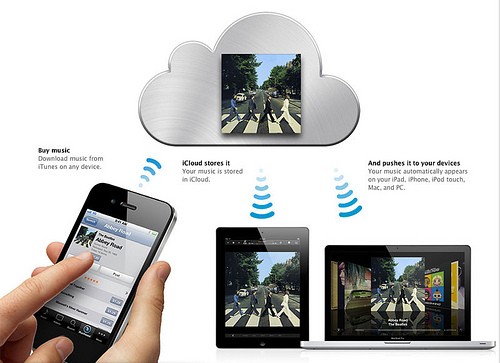
Replaceing Apple's MobileMe service, iCloud integrates seamlessly with iOS devices such as the iPhone, iPad and iPod touch and Mac OS X devices such as MacBooks and iMac. The cloud-based system allows users to store music, photos, applications, documents, bookmarks, reminders, backups, notes, iBooks, and contacts, as well as serving as a platform for Apple's email servers and calendars.

Third-party iOS and OS X app developers are able to implement iCloud functionality in their apps through the iCloud API.

The iCloud service is connected to your Apple ID and each user gets 5GB of free storage. However certain content purchased from the iTunes Store, currently including music, apps, audio books, TV shows and movies, do not count towards your limit as they are separately linked to your Apple ID. Your photos, which can be set to be automatically backed up, also don't count towards your storage limit.

This means that any content previously purchased via iTunes Store can automatically, or manually if preferred, be downloaded to any registered device and you can register up to five devices which will need to be running iOS 5.x or Mac OS X Lion. Access though the web portal is limited to seeing your contacts, a find my iPhone app, calendar and iWork documents. You won't be able to see your photos online which is a pity.

Additional storage can be purchased if you don't buy your music or movies through iTunes priced at £14 per year for an additional 10GB up to a total of 50GB for £70 per year.

The service works very well if you are an Apple user already and use iTunes on a regular basis to purchase music and movies. If you have a Mac, iPhone, iPad and MacBook then iCloud is a great solution. However if you have an iPhone but use a Windows PC then it's not such an elegant solution, but the 5GB of free cloud backup is welcome none the less.

Google Drive vs Microsoft SkyDrive

SkyDrive is Microsoft's answer to cloud storage and offers very similar functionality to both Dropbox and Google Drive.

SkyDrive has a Mac and Windows desktop app which lets users drag and drop files in the SkyDrive folder and they are automatically synced and available on other devices running SkyDrive.

One feature which SkyDrive has though over Google Drive is called Fetch. This allows users to remotely access files on the hard drive of their home PC while on the move or at the office. A very powerful tool, this means you will never forget a file - though SkyDrive needs to be installed and the computer turned on.

Google is bigging up the sharing aspect of Drive, but SkyDrive's recent upgrade now means you can share files by sending links in a similar way to Google Drive, instead of having to attach big attachments.

Looking at the amount of storage Microsoft offers, since launching in 2008 users were given a huge 25GB for free. Unfortunately Microsoft has this week cut that right down to 7GB, though this is still more than Dropbox, Apple or Google. However existing users will be able to hold onto the 25GB but new users are limited to 7GB.

As well as the obvious Windows Phone 7 app, SkyDrive does also have an iOS app, meaning you can view and share files from your iPhone and iPad. You can upload photos from the iOS app and it will even let you view Word, Excel and Powerpoint documents using third-party apps such as Keynote and Pages.

If 7GB is not enough for you then there are a number of paid options available, with 20GB costing $10 a year while 50GB costs just $20 a year, which is 80 percent less than Dropbox.

Overall the SkyDrive option seems the best value and offers the most fully featured service. Add an Android app to the mix and Microsoft could be onto a winner.

This article is copyrighted by IBTimes.co.uk, the business news leader
Join the Conversation
Chinese Farmer Builds His Own Bionic Arms