

iOS 6 Beta 3 Jailbreak: How to Jailbreak A4 Devices Using Redsn0w 0.9.13dev3 [VIDEOS & TUTORIAL]

The Dev Team of hackers has released an updated developer version of the Redsn0w jailbreak tool for iOS 6 developers, who are being encouraged to test new firmware update iOS6 Beta 3 with the updated Redns0w version 0.9.13dev3.
Here is an excerpt from the Dev Team's Blog: "The dev3 version covers today's 6.0beta3 release (and also adds explicit support for 6.0beta2). Please point redsn0w at the 6.0b3 IPSW in order to jailbreak beta3 and boot tethered."
It must be noted the Redsn0w developer version releases are meant strictly for developers and not the general public. In addition, there may be glitches similar to bugs in a beta version of the software. Furthermore, this release does not include Cydia support, as certain packages have not been updated to support the new firmware.
For all interested developers who want to test the latest firmware jailbreak for iOS 6 beta 3, check out IBTimes UK's step-by-step guide below...
[Courtesy: iMORE]
How to Jailbreak iOS 6 Beta 3 on A4 Devices Using Redsn0w 0.9.13.dev3
Step 1: Download Redsn0w 0.9.13dev 3 for Windows
Download Redsn0w 0.9.13dev3 for Mac
Step 2: Download and save iOS 6 beta 3 firmware file (IPSW) from Apple's developer Web site. Unlike previous releases - which prompt you to point to an earlier release - beta 1 - the new version enables you to skip these steps and point directly to the beta 3 file.
Step 3: Put the iPhone, iPad or iPod Touch into Device Firmware Update (DFU) mode. Follow these steps (or check the video below) to place your A4 device into DFU mode:
- Plug iPhone, iPod Touch, or iPad into Mac or Windows PC while ensuring iTunes is running
- Simultaneously press both the Sleep button (on top of the device) and the Home button (on the front underneath the screen) and hold for 10 seconds (If you see the Apple logo, you've held them too long and will need to start over)
- Release Sleep button but keep Home button pressed for about five seconds (If you see the Plus into iTunes screen than you held it too long and will need to start over)
- If the screen stays black, the iPhone, iPod Touch or iPad has entered DFU mode
Step 4: Now launch Redns0w and tap Extras
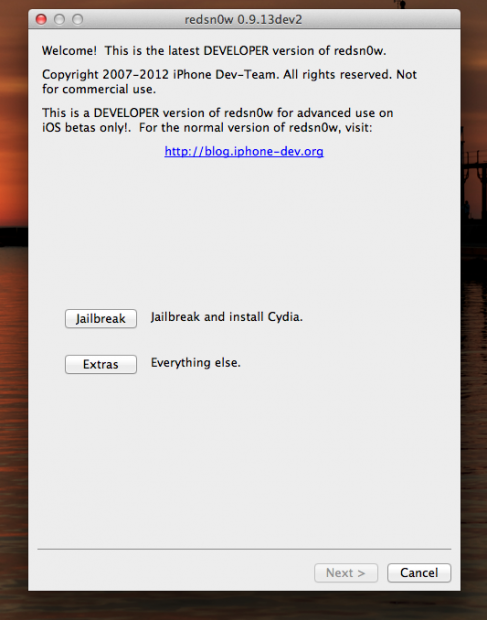
Step 5: Tap Select IPSW, browse to location of the IPSW file for iOS 6 beta 3 downloaded in Step 2 and select it
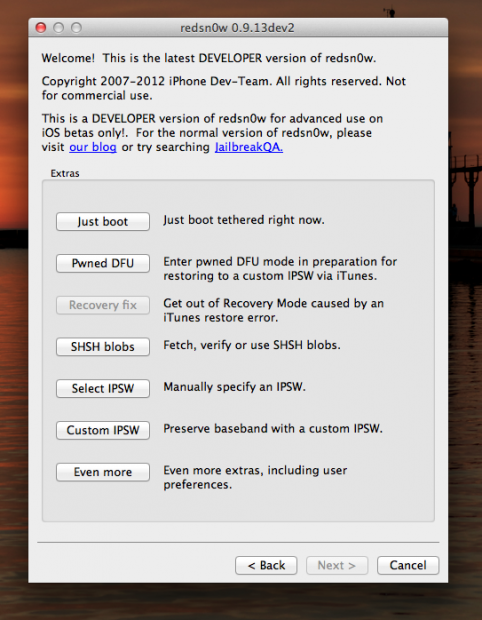
Step 6: Return to main screen of Redsn0w tool and click Jailbreak
Step 7: Ensure Install SSH option is checked and click Next
How to Perform Tethered Boot
Since the developer version of the Redsn0w tool supports only tethered jailbreaks, you need to perform a tethered boot after the jailbreak has been successfully installed.
Step 1: Put iPhone, iPad or iPod Touch into DFU mode again
Step 2: Return to main screen of Redsn0w, tap Extras again and then click Select IPSW
Step 3: Navigate to iOS 6 beta 3 file and select Just Boot from Extras menu
For further assistance on jailbreaking iOS 6 beta 3, check out the video below [Courtesy: iDownloadBlog]:
At this moment, Redsn0w will reboot and bring up your desktop screen without the Cydia option. However, if you are keen on running third-party apps and tweaks with the beta operating system, then you could install .deb files using afc2 or SSH command line interface as an alternative to Cydia.
© Copyright IBTimes 2026. All rights reserved.