

When an Employee Leaves, Who Still Has Access to Your WordPress Site?
A complete handover should cover hosting, domains, recovery routes, shared credentials, integrations, backups and content ownership—not just the WordPress user list

An employee returns their laptop and leaves the company. Their WordPress account is removed. Two weeks later, the website owner discovers that the same person also knew the hosting password and managed the domain's recovery email.
This is a hypothetical scenario, but the management problem is straightforward: access follows systems and credentials, not just a person's entry in the WordPress user list. A website offboarding process needs an owner who can account for each route.
The practical goal is to transfer responsibility without losing control of the site, deleting useful content or leaving a shared credential in circulation. Start before the final working day where possible and verify the result through the relevant service.
Make One Person Responsible for the Whole Map
Assign a website owner to coordinate the work with the employee's manager, IT team and any outside agency. Each system can still have its own administrator. One person should be able to explain which checks are complete and which remain open.
Build the map from the site's dependencies: WordPress, hosting, file transfer or deployment access, domain registrar, DNS, email delivery, backups, analytics and third-party integrations. Include recovery email addresses and multifactor recovery ownership. A website can remain accessible while its business loses the ability to renew or recover the domain.
Record account identifiers, owners and review status in an access register. Keep passwords, recovery codes and private keys in an approved secrets system. The register should point to the responsible custodian without becoming another credential dump.
| Access route | Owner's question | Completion evidence |
| WordPress account | Is the remaining role appropriate, or should access end? | Authorised account change and a separate check of relevant sessions and credentials. |
| Hosting and deployment | Were access or shared secrets known outside the remaining team? | Provider-confirmed revocation or controlled rotation, with deployment verified. |
| Domain, DNS and recovery | Can the business renew and recover the service independently? | Current authorised owners and recovery routes confirmed in the provider account. |
| Integrations and automation | Which keys or application credentials belonged to this person? | Each credential revoked, transferred or replaced, and its business workflow checked. |
| Backups | Can another authorised person restore the site? | Access and required recovery material verified without the departing account. |
Treat Named Accounts and Shared Secrets Differently
A named WordPress account offers a clear place to review role and access. A shared administrator password has a different problem: changing one user entry may not remove a secret that several people know. Identify shared credentials explicitly and arrange authorised replacement where needed.
Coordinate changes to avoid interrupting the business. A secret might also be stored in an integration or a deployment process. Before rotating it, identify the dependent workflows and who will verify them. Avoid moving a departing employee's personal credential into a new shared document as a shortcut.
For urgent or contentious departures, follow the organisation's established process and preserve relevant records. Website administration should support that process without improvising allegations from an account name or a log entry.
Review More Than the Login Password
Review active sessions through the available authorised controls and manage other credentials separately. WordPress Application Passwords are individually revocable credentials for programmatic access. They are distinct from the normal browser-login password and may be used by publishing tools, scripts or other integrations.
Determine which of those credentials are still required and whose account owns them. Revoke those that are no longer authorised; replace necessary integrations under an appropriate business-controlled account. Changing an interactive password should not stand in for that inventory.
Review the remaining administrators as well. Each should have a named responsibility, suitable authentication and a recovery route controlled by the business. A single remaining administrator with no recoverable second factor is a fragile handover.
Preserve Content Before Deleting an Author
WordPress can offer a choice between deleting a user's content and attributing it to another user during account deletion. Review that decision carefully. Reassign content to an appropriate continuing owner where the business intends to retain it.
Check the installed site's content types and integrations rather than assuming that every membership, commerce or course record follows the standard author workflow. Arrange a suitable backup and ask the relevant maintainer about custom behaviour before a destructive change.
When several users need different content owners, plan the reassignment deliberately. A fast bulk action can be difficult to undo if it removes material that the business expected to keep.
Use Security Tools for the Questions They Can Answer
Site-level protection can support the remaining team. For example, Shieldlume Security on WordPress.org documents free local file review and native WordPress account protections, including authenticator-based two-factor authentication and recovery options. Its passkey option is a second factor alongside a password, not a promise of passwordless login.
Those features do not revoke a hosting account, transfer a domain or perform automated staff offboarding. A file difference or a contextual event also does not prove which person caused it. Keep access management, technical observations and any investigation as separate decisions with their own evidence.
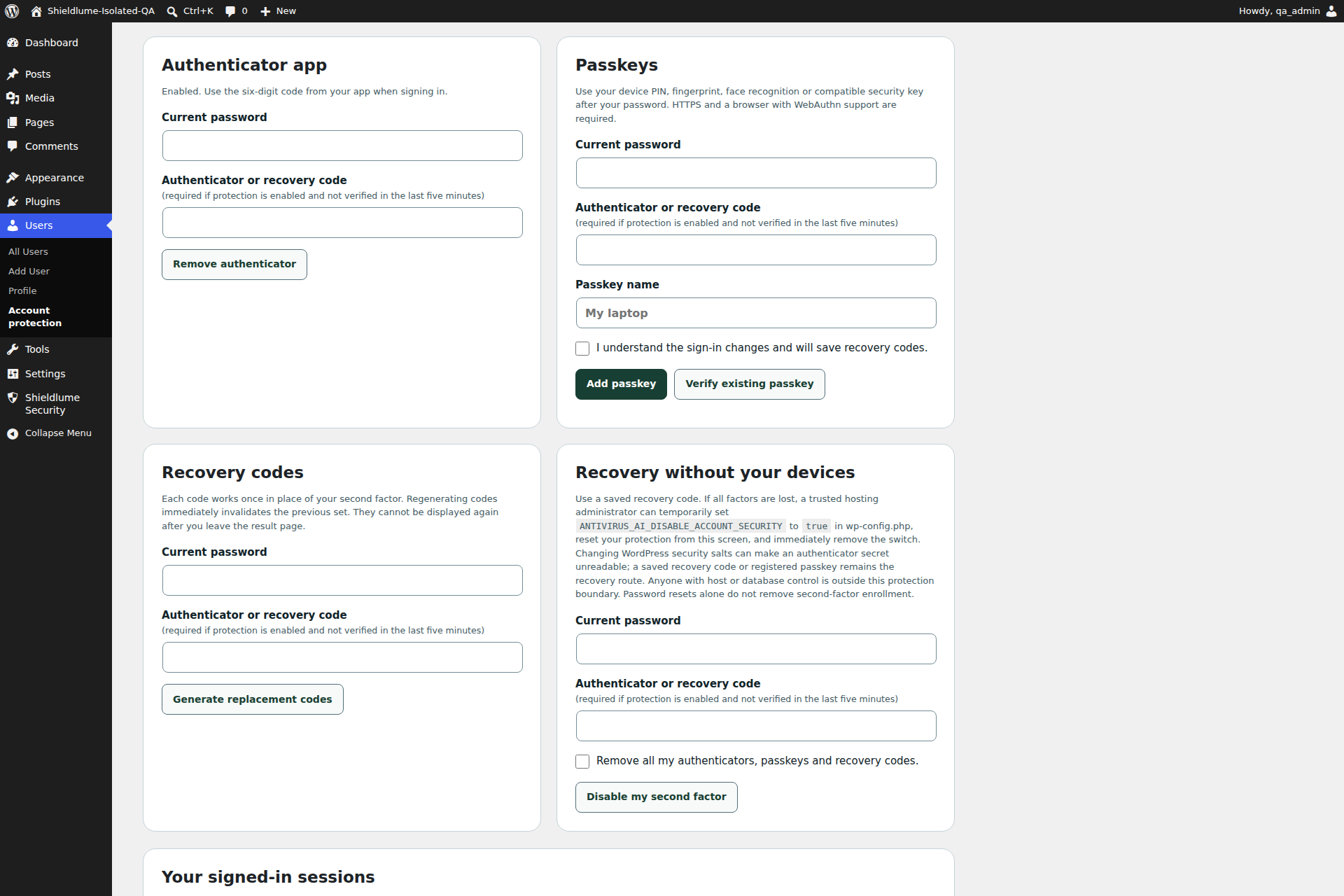
These are site-level account controls; hosting, domain and provider access need separate review. Official vendor demonstration on a practice installation; not an independent test or customer incident.
Verify the Handover From the Business Side
Have an authorised remaining owner confirm access through the supported controls of each provider. Test necessary workflows after changes: publishing, deployment, transactional email and other functions that relied on replaced credentials. Record the outcome without circulating the new secrets.
Give unresolved access a named owner and a deadline proportionate to its importance. An agency that has not confirmed account ownership is an open item, even if the website still looks normal. Escalate through the business's established vendor process.
Keep the completion record separate from any personnel file. Most maintainers need to know what access changed and who owns the service now, without receiving private details about the departure.
Finally, review the register at the next significant staffing or supplier change. A sound handover leaves the organisation able to operate, recover and explain who is authorised. Removing a WordPress user is one useful step in that process; the surrounding access map makes it complete.
© Copyright IBTimes 2026. All rights reserved.