

Apple Homeview Software Update Offers a Closer Look at Liquid Glass, Snoopy Faces and Its Music Player
Apple's HomeView software has revealed a Liquid Glass slider, Snoopy clock faces, swipe typing and a closer look at the smart home hub's music player
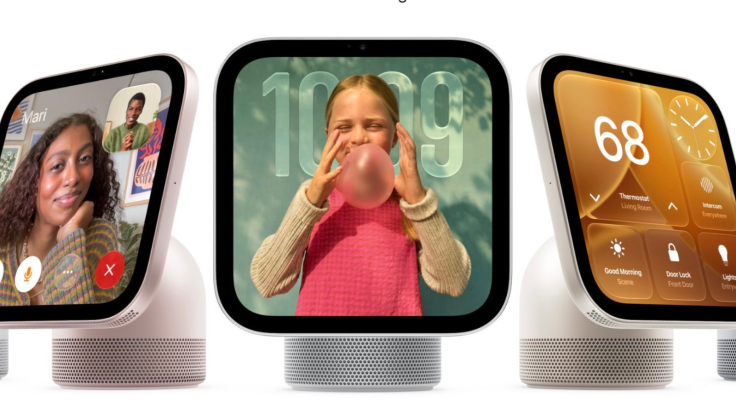
Apple's £230 HomeView smart home hub has been revealed in unprecedented detail ahead of its 13 November launch, after developers accessed a virtualised version of the software and uncovered new controls for its 'Liquid Glass' interface, Snoopy clock face and media player.
Broadcasts app developer Steve Troughton‑Smith explored the software using a virtualised HomeView created by developer Guilherme Rambo. Their findings offer the clearest public look yet at how Apple's new $299 (€260 and £230) home hub is likely to work in real households.
Apple has already demonstrated the device to selected reporters and creators, but Troughton‑Smith's walkthrough went further, showing the home screen, Control Centre, clock faces and built‑in apps.
For context, Apple announced HomeView on 13 October as a smart home hub with a 7‑inch Liquid Retina display, Siri AI and a built‑in camera. The company said it can recognise up to six people and tailor content for each user, while shared albums and music remain available to everyone in the household.
Inside the Home Screen, Controls and Clock Faces
Troughton-Smith examined the home screen, Control Centre and several system apps, including Timers, Alarms, World Clock and Settings. He also looked at the Flow and Snoopy clock faces, the latter responding to context such as the time of day and weather.
One detail stands out. The virtualised software includes an Ethernet menu, even though the physical HomeView supports Wi-Fi only. It is the sort of small mismatch that often appears in pre-release software, though Apple has not publicly explained it.
The software also appears to include a Liquid Glass slider. According to Troughton-Smith, it lets users adjust how clear or tinted interface elements look. He also confirmed that the device's keyboard supports QuickPath swipe typing.
HomeView's built-in camera can recognise people and display personal content in apps including Messages, Calendar, Reminders, FaceTime and Find My. In the virtualised version, however, Rambo and Troughton-Smith had not bypassed that recognition requirement, so those apps remained locked.
Music, Video and Airplay on a Shared Screen
The walkthrough also covered the HomeView's media features. Troughton-Smith shared a closer look at the music player, the video player in both wide and square formats, and the AirPlay pairing interface.
Apple has positioned the device as a shared household screen rather than simply another smart display. Its aluminium body sits on a domed speaker base, connected by a stainless steel tilting hinge, and the company says the audio system includes two full-range drivers, a down-firing woofer and two force-cancelling passive radiators.
The Snoopy face may prove the most immediately recognisable feature. Apple says it reflects context such as the time of day and weather, giving the hub a lighter, more personal feel than a conventional control panel.
Rambo and MacRumors contributor Aaron Perris previously examined the HomeView's wallpapers, its 'hello' setup screen and other elements of the software. Those findings came after Apple released the HomeView software ahead of the device's launch.
Launch Timing, Pricing and Regional Limits
Apple is currently accepting pre-orders for HomeView, with US pricing set at $299 (€260 and £230). The device is scheduled to launch on Friday, 13 November.
Rambo and Troughton-Smith said the HomeView software is based on the Apple TV's tvOS. That suggests Apple has reused parts of its television platform for a device intended to sit in kitchens, on nightstands or beside sofas.
There is a catch for UK readers, though. Apple's announcement said HomeView is not available in the European Union. IBTimes UK cannot independently verify whether that restriction will extend to the United Kingdom, so take that detail with a grain of salt.
The software leak does not answer every question. It remains unclear how reliably face recognition will work in real homes, how much personalisation users will actually notice, or whether the Liquid Glass slider will feel useful rather than fiddly. But it does suggest Apple is treating HomeView as more than a smart-home dashboard.
For now, the clearest picture of the device comes not from Apple's marketing but from developers poking around software that was never meant to be examined quite this closely.
© Copyright IBTimes 2026. All rights reserved.